Markdown is portable, straightforward to use, and readable both rendered and as raw text. However, effectively collaborating with others on a Markdown file requires some hacks and workarounds.
One feature that would greatly improve Markdown collaboration is being able to insert and reply to comments. Which is why we’ve introduced it for Nextcloud Text, Notes, and Collectives with the Nextcloud Hub 26 Summer release!
This article will go into more detail on how we implemented this feature, but you might be asking yourself: aren’t comments already a thing in Markdown? Well, yes and no. Let’s take a closer look.
Table of contents
How the community tried to make comments work in Markdown
When John Gruber created Markdown in 2004, he described its syntax informally, and that description was ambiguous in places. In 2014, a group of developers set out to close these gaps with a community specification they called CommonMark. However, neither Gruber’s original syntax nor CommonMark includes a Markdown-specific syntax for comments.
That’s why many Markdown users have resorted to a workaround based on link reference definitions, which were already part of Gruber’s original syntax description. The technique is described in a popular answer on Stack Overflow.
Link reference definitions belong to reference-style links, which let you define a link once and use it elsewhere:
Please refer to the [Nextcloud Text repo][repo link] for more details.

[repo link]: https://github.com/nextcloud/text (Link to the Nextcloud Text repository on GitHub)
As you can see in this example, [Nextcloud Text repo] isn’t followed by a URL in parentheses, as would be the case with an inline link, but by the label repo link in square brackets. Elsewhere in the document, a link reference definition assigns that label a URL and an optional title.
So what if you define a label and then never reference it in the text? In that case, its contents leave no trace in the final HTML. (In 2004, Markdown-formatted text was primarily meant to be converted into HTML.) So people started using unreferenced link reference definitions as comments:
Markdown is portable, straightforward to use, and readable both rendered and as raw text.

[comment]: <> (Hey there, I'm using link reference definitions for comments in Markdown!)

However, effectively collaborating with others on a Markdown file requires some hacks and workarounds.
Here, <> serves as an empty placeholder URL, and the comment itself is the definition’s title.
Still, this workaround was far from perfect: The syntax is cryptic for anyone who doesn’t know the trick, each comment line needs its own [comment]: <> prefix, certain characters such as unbalanced parentheses can break it, and not every Markdown parser or editor handles it the same way.
When we decided to implement a commenting feature in Nextcloud Text, we went with a more robust approach.
How we implemented Markdown comments in Nextcloud Text
Many Nextcloud apps support Markdown syntax, but it is front and center in Nextcloud Text, our collaborative text editor that also powers Nextcloud Notes and Nextcloud Collectives.
Due to the app’s collaborative nature, having a native option to add comments was a highly requested feature. Here’s how we made it happen.
All in a footnote
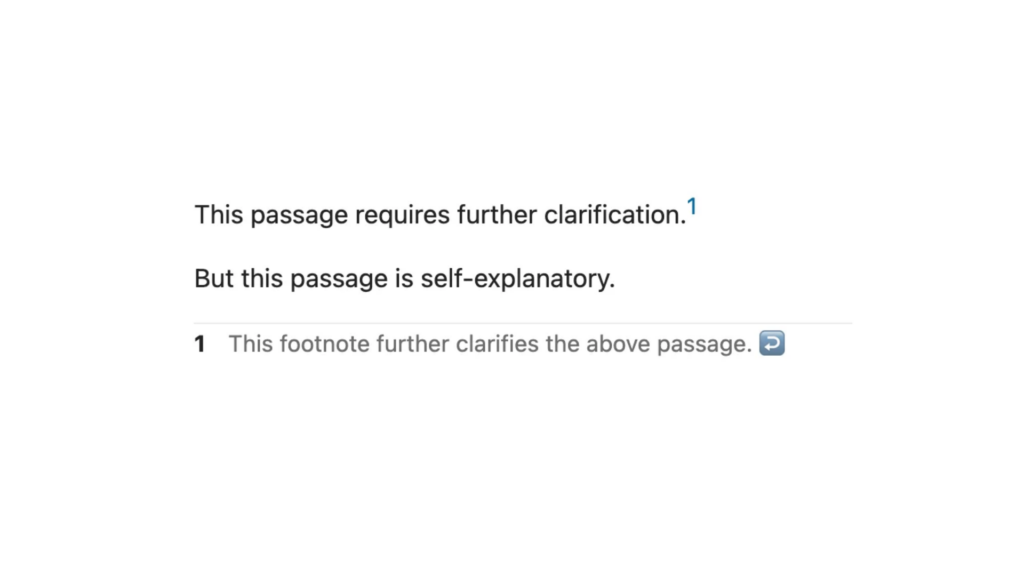
John Gruber’s original Markdown syntax description from 2004 lacked one aspect that was crucial for writing academic papers: footnotes. That’s why a community-driven extension introduced the [^1] syntax, which quickly became the de facto standard for including footnotes and is now supported by many Markdown parsers.
You simply place a caret and an identifier (can be a number, but doesn’t have to be) in square brackets where you want the footnote marker to appear, then define the footnote on its own line using the same identifier followed by a colon:
This passage requires further clarification.[^1]

But this passage is self-explanatory.

[^1]: This footnote further clarifies the above passage.
Markdown comments that don’t break portability
We took the footnote feature and, to make comments work with it, added syntax for comment replies, display names, Nextcloud user IDs, and timestamps.
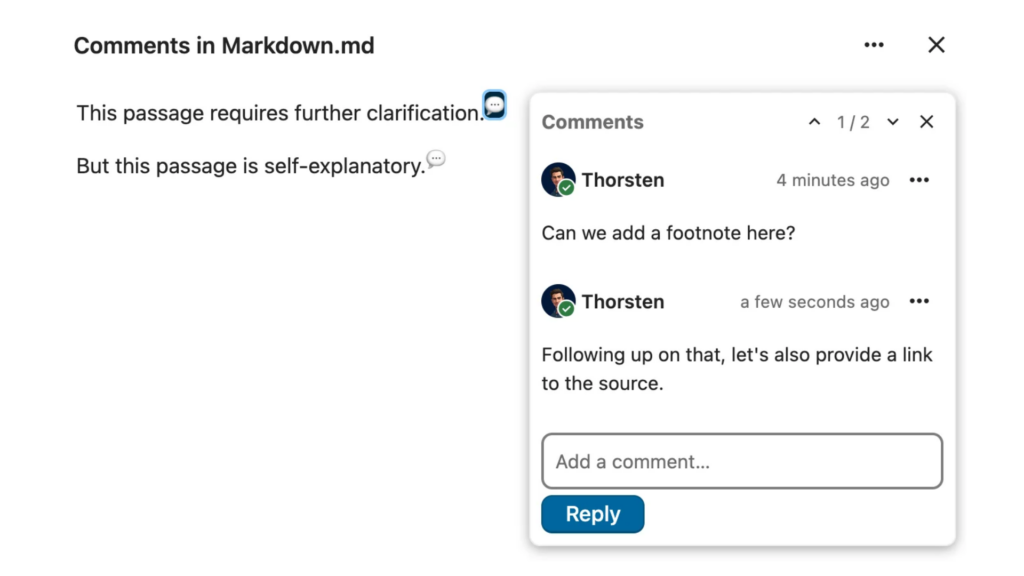
To insert a comment in your Markdown file, simply click on the new speech bubble icon in Nextcloud Text’s toolbar. This will insert a comment mark at the current cursor position and the comment thread will open, allowing you to type your comment.
In the raw text, the comments will look like this:
This passage requires further clarification.[^comment-1]

But this passage is self-explanatory.[^comment-2]

[^comment-1]:
    - @[Thorsten](mention://user/thorsten) *(2026-10-05T13:14:57.626Z)*
      Can we add a footnote here?
    - @[Thorsten](mention://user/thorsten) *(2026-10-05T13:17:48.080Z)*
      Following up on that, let's also provide a link to the source.

[^comment-2]:
    - @[Thorsten](mention://user/thorsten) *(2026-10-05T13:18:05.184Z)*
      Actually, I think this needs further clarification as well.
Let’s break this down:
[^comment-1] marks the first comment thread created in the document, [^comment-2] the second one (these are actually footnote identifiers).
At the end of the document, you get a list for each comment thread. Each item represents one comment in that thread and contains the following information:
A mention of the comment author that contains their display name and Nextcloud user ID, formatted as a Markdown link (e.g. @[Thorsten](mention://user/thorsten))
The comment’s timestamp (e.g. (2026-10-05T13:14:57.626Z))
The comment’s content (e.g. Can we add a footnote here?)
Technically, these are still footnotes, but Nextcloud Text’s Markdown parser recognizes them as comment syntax and interprets them visually, so you get the speech bubbles that signify inline comments as well as the UI for comment threads that lets you quickly type and add a reply.
The advantage of using widely supported syntax for this feature is that comments inserted in Nextcloud Text are still legible if you open the file in another tool with Markdown support.
And the cherry on top: since Nextcloud Notes and Nextcloud Collectives are based on Nextcloud Text, these two apps now support Markdown comments as well!
Nextcloud apps: a true community effort
Markdown comments are just one of many features requested by the Nextcloud community that we implemented as part of Nextcloud Hub 26 Summer. We highly value the input from Nextcloud users and contributors and try our best to make each app the best it can be based on your feedback.
If features like this make you want to contribute, have you ever thought about building your own Nextcloud app? We’ve released a beginner’s guide to teach you the basics of how Nextcloud works under the hood and how you can build your app around that.
After that, you’re ready for Nextcloud Academy, a free resource with hands-on online courses that take you from setting up your development environment all the way to a finished Nextcloud app. You can even choose between PHP and Python. Give it a try!
At the second Nextcloud Enterprise Day Copenhagen, municipalities, universities and other public organisations discussed how they can reduce their dependency on US Big Tech. Read our recap of the event.
Created in a joint effort of our team, community, and partners, Nextcloud Hub 26 Summer learns from real people using our tools every day. Create your team's own space with Nextcloud Teams, organize your memories in new Nextcloud Photos, and enjoy the updates you asked for across all apps. Read on for a full rundown of our latest release!
We are introducing the Nextcloud ISV Partner Program to support independent app developers through the Nextcloud app store. Read more in this article and get in touch with our team if you want to join the program.
We explore challenges Nextcloud Talk solves that Microsoft Teams can't, uncovering a stronger alternative for organizations that that prioritize digital sovereignty, compliance, and control.
Following two successful Nextcloud Enterprise Days in The Hague in 2025, we brought the event to Utrecht this year, where a massive 750 registrations brought a big crowd to the Jaarbeurs venue. The kickoff in the morning pre-announced the launch of the book “Sovereignty! But how?“ by well-known Dutch IT security journalist and author Brenno […]
In the Nextcloud 2024 wrap-up, we want to take a moment to celebrate this year's achievements. Join us as we continue to reimagine what’s possible - shaping a world where open source, privacy and connection come together and drive progress for the greater good.
Organisations, small and large, need a way to ensure the resiliency and digital sovereignty of their operations – an open-source, privacy-respecting alternative to Teams. And today, we present that solution - Nextcloud Talk.
Nextcloud has been recognized with the World Summit Award Germany that selects and promotes local digital innovation improving society, aiming to contribute to the United Nations' agenda of sustainable development goals.
DIE ZEIT, a prominent German outlet, interviewed Nextcloud’s founder Frank Karlitschek for an article on Microsoft’s anti-competitive behaviour on the European office software market. Read for a recap of the article and the key takeaways.
MagentaCLOUD’s migration to Nextcloud in 2021 resulted in a fully equipped Online Storage with an integrated online office suite that further improves the user experience, flexibility and security for customers.
We bring you a major update to the Nextcloud AI Assistant, plus the news we work with several big hosting providers like IONOS and OVHcloud to bring AI-as-a-Service options to you!
Bechtle and Nextcloud announce today a complete managed collaboration platform for the public sector that requires no tender and can be deployed immediately.
Discover how to make the switch from ownCloud to Nextcloud. Our quick guide provides insights into the migration process, helping you make the transition smoothly.
Today, US-based file sync & share vendor Kiteworks announced their acquisition of ownCloud and Dracoon. Kiteworks points out that their customers now have access to their file-sharing application. It is to be expected they will not maintain 3 similar products, but customers will have to migrate to the US firms’ platform or look for another […]
As part of Schleswig-Holstein's state digitization strategy, the state chancellery has announced they will work with Nextcloud to develop AI for working with government documents. This comes just after we announced the first private AI assistant last weekend with Hub 6. The German state already uses Nextcloud and their AI strategy aligns with our work on ethical, local AI technologies.
Cyberattacks can now be carried out faster than ever, with less human involvement and on a much larger scale. Air-gapped environments offer a way to protect sensitive data and critical systems from increasingly sophisticated attacks.
Don’t let your inventory lists and sales figures sit on servers you have no control over. With Nextcloud Spreadsheet, everything stays on your own infrastructure.
Fancy names, same lock-in: here's why Microsoft’s digital sovereignty promises don’t protect European data from US law and why its “sovereign” cloud still leaves you dependent.
We save some cookies to count visitors and make the site easier to use. This doesn't leave our server and isn't to track you personally!
See our Privacy Policy for more information. Customize
Statistics cookies collect information anonymously and help us understand how our visitors use our website. We use cloud-hosted Matomo
Service:Matomo
Cookies description:
_pk_ses*: Counts the first visit of the user
_pk_id*: Helps not to double count the visits.
mtm_cookie_consent: Remembers that consent for storing and using cookies was given by the user.
Cookies expiry:_pk_ses*: 30 minutes
_pk_id*: 13 months
mtm_cookie_consent: 30 days