You know Nextcloud inside and out. You’ve set up your instance, you know which apps you couldn’t live without, and at some point you’ve probably thought: „I wish Nextcloud could also do this.“
You can build it yourself, and it doesn’t have to be in PHP. With ExApps, you can write Nextcloud apps in other programming languages like Python and run them as small web services. The ExApp track on Nextcloud Academy walks you through the whole process, from an empty folder to an app that’s ready for the Nextcloud App Store.
You don’t need to be a seasoned Python developer to follow along. If you know your way around the command line and have used Git before, the course takes it from there, one step at a time.
What is an ExApp?
Classic Nextcloud apps are written in PHP and run inside the Nextcloud server itself. ExApps (short for „external apps“) take a different approach: your app is its own small web service, running next to Nextcloud rather than inside it.
The bridge between the two is the Nextcloud AppAPI, which ships with Nextcloud. It forwards requests from Nextcloud to your app, checks that every request is authenticated, and manages your app’s lifecycle, for example what happens when an admin enables or disables it. Since your code runs in its own process, you can use any Python libraries you need without touching Nextcloud’s PHP environment.
In terms of user experience, ExApps feel like regular Nextcloud apps: they get their own entry in the navigation bar, use Nextcloud’s own Vue components, know who’s logged in, and can call back into Nextcloud for files, users, notifications, and more.
ExApps can be written in any language that speaks HTTP, but Python is an especially good fit because of the Nextcloud Python Framework. It handles authentication, the app lifecycle, and Nextcloud API calls out of the box. Add FastAPI for the backend and SQLAlchemy for the database and you’re working with a familiar, well-documented stack.
Building a Python ExApp for Nextcloud
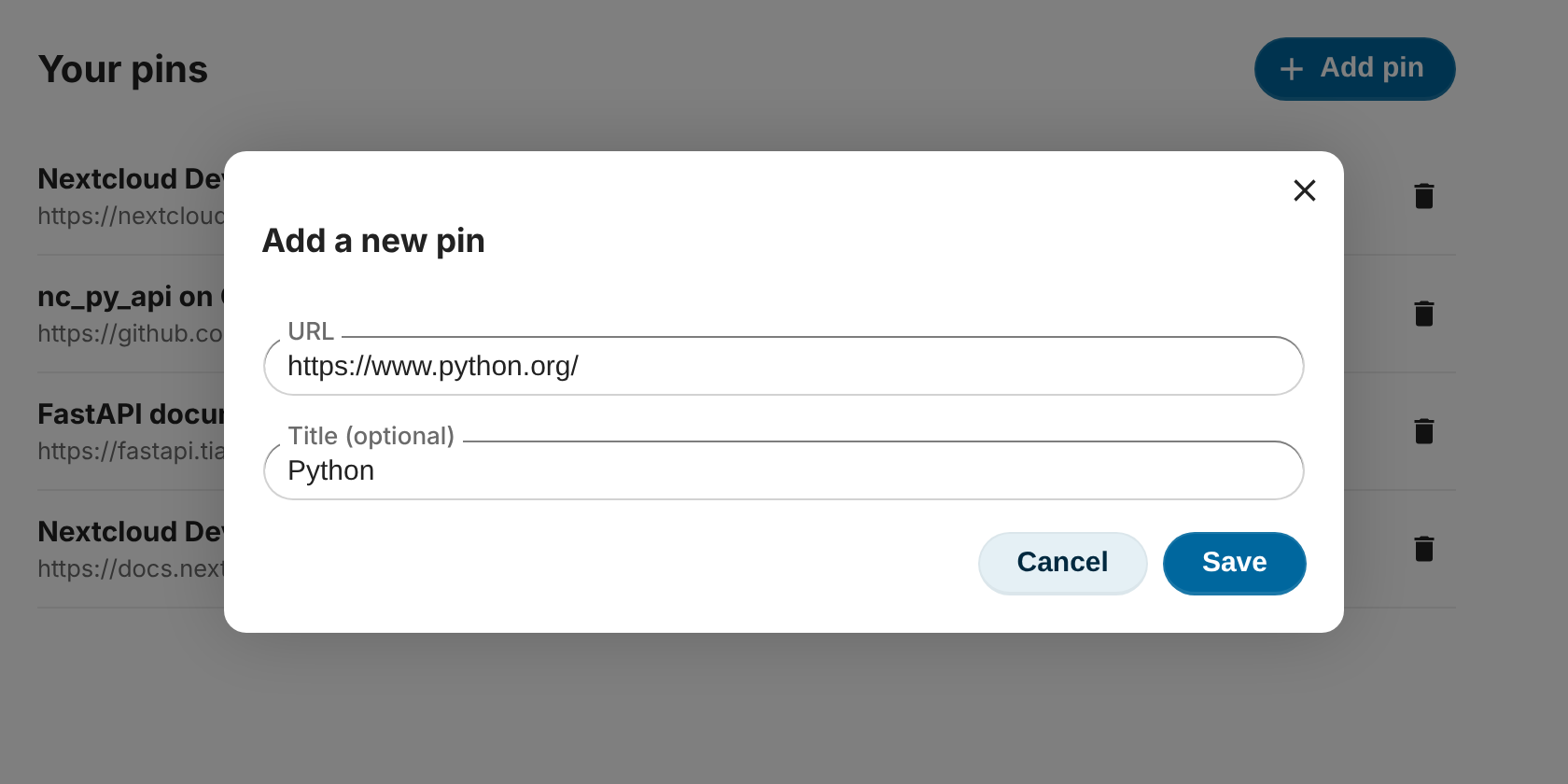
Throughout the ExApp track, you use Python to build Pinboard, a small app for saving links. Each user gets their own private collection of pins, right inside Nextcloud.
The Pinboard example app lets multiple users add links to a collection
Pinboard is simple enough to finish, but real enough to touch every important part of an app: a backend API, a database, a user interface, user identity, and packaging. It’s also the same app the PHP track builds, so if you’re curious later, you can compare both approaches side by side.
The beginner track has eight modules and takes roughly 10–12 hours to complete:
1. Environment Setup: You set up a local Nextcloud development instance, make sure AppAPI is enabled, and register a special development daemon that lets you run your app directly on your machine, without rebuilding the Docker image every time you change something. Then you install the Nextcloud Python Framework and connect your first skeleton app to Nextcloud.
2. ExApp Anatomy and Request Lifecycle: Here you learn how the pieces fit together: the project structure, the info.xml manifest, and the lifecycle calls Nextcloud makes to your app. You also see how AppAPI authenticates every request, and you set up a Makefile so that make run and make register replace long terminal commands.
3. Backend Fundamentals: Pinboard shows up in Nextcloud’s navigation bar for the first time, and you write your first API endpoints with FastAPI. You also learn how to write to Nextcloud’s log and how to test your endpoints through AppAPI.
4. Database Layer: Unlike PHP apps, ExApps own their database entirely. You store pins in SQLite using SQLAlchemy, keep the data in the persistent storage AppAPI provides, and make sure every user only ever sees their own pins.
5. Frontend Toolchain: You set up the build pipeline for a Vue frontend. The twist compared to PHP apps: your Python service serves the compiled files, and the browser loads them through AppAPI. By the end, Pinboard displays its first message inside Nextcloud.
6. Your First Vue Component: Now Pinboard gets a real interface, built in three steps: a list of pins with loading and empty states, a form to add new pins, and success and error notifications. Because you’re using Nextcloud’s own components and theming variables, the app automatically adapts to dark mode and custom branding.
7. Users and Identity: You learn how AppAPI turns a user’s session into an identity your code can trust. Then you add the ability to delete pins, and make sure no one can delete anyone else’s, along with a lesson on why „this isn’t yours“ should look exactly like „this doesn’t exist.“
8. Packaging and Deployment: Finally, you turn Pinboard into a release. You complete the app manifest and build a Docker image that runs on both x86 and ARM servers. Then you learn how to publish your app on the Nextcloud App Store, where admins can install it like any other app.
A taste of the code
How much code does it take to get started? Here’s the first endpoint from module 3:
@APP.get("/pins")
async def get_pins(nc: Annotated[NextcloudApp, Depends(nc_app)]):
    """Return all pins for the current user."""
    nc.log(LogLvl.DEBUG, f"get_pins called by user: {nc.user}")
    return []
That’s an authenticated API endpoint. The decorator defines the route, and Depends(nc_app) hands you a ready-to-use connection to Nextcloud on behalf of whoever made the request. nc.user tells you who that is, and nc.log() writes straight to the Nextcloud log. For now it returns an empty list. In module 4, it starts returning real pins from the database.
And getting your app into Nextcloud’s navigation bar? That’s a single call when your app is enabled:
Nextcloud Academy is currently in beta, with only the beginner tracks available right now. The intermediate track will build on Pinboard with file operations, event listeners, background jobs, OCC commands, and sharing.
Before you start, make sure you have:
Docker (with at least 8 GB of RAM it can use and about 20 GB of free disk space)
Python 3.10 or later
Basic Git skills and a GitHub account
If you spot a mistake or something is unclear along the way, every page has a „Report an error“ link that opens an issue on GitHub. Feedback is very welcome.
Ready to build your first Nextcloud app in Python? Head over to Nextcloud Academy and start with module 1. And if PHP is more your thing, the PHP track builds the same app the classic way.
Nextcloud Hub 26 Summer ist eine Gemeinschaftsleistung des Nextcloud-Teams, unserer Community und unserer Partner und wird auf Grundlage davon weiterentwickelt, wie es tagtäglich genutzt wird. Erstellen Sie mit Nextcloud Teams einen eigenen Bereich für Ihr Team, organisieren Sie Ihre Erinnerungen mit der neuen Nextcloud Photos-App und nutzen Sie die von Ihnen gewünschten Features in allen Apps. Lesen Sie weiter, um einen vollständigen Überblick über den neuesten Release zu erhalten.
Nextcloud ist die erste Cloud-Plattform, die mit dem Umweltzeichen „Blauer Engel“ ausgezeichnet wurde und damit beweist, dass eine digital souveräne und grüne IT möglich ist.
Unternehmen, ob klein oder groß, brauchen eine Möglichkeit, die Ausfallsicherheit und digitale Souveränität ihrer Abläufe zu gewährleisten - eine Open-Source-Alternative zu Teams, die die Privatsphäre respektiert. Und heute stellen wir diese Lösung vor - Nextcloud Talk.
Bechtle und Nextcloud kündigen heute eine vollständig verwaltete Kollaborationsplattform für den öffentlichen Sektor an, die keiner Ausschreibung bedarf und sofort bereitgestellt werden kann.
Our mission is to help individuals, businesses and organizations achieve digital sovereignty and regain control over their data. Nextcloud Hub 5 marks a massive step forward towards achieving this mission, putting the power of AI into your hands – in a way that keeps you in control. New release, new possibilities Hub 5 builds on […]
One year ago, the European Commission proposed the Digital Omnibus, a package to “simplify” EU digital rules. Its most important part is still being negotiated: a GDPR change that would make it easier for companies to train AI on your personal data, while EU governments want to weaken your right to say no. Here’s where things stand, who’s lobbying, and how to keep your data out of someone else’s AI.
What does the dependency on U.S. Big Tech put at risk and what can Canadian organizations learn from Europe’s digital sovereignty movement? In this article, we try to find the answers.
Jan Vales, System Administrator for the TUcloud at TU Wien, tells us about university's 35,000-user Nextcloud setup, how share links solved TU Wien’s external collaboration problems, and why he thinks open source should win over closed source.
Wir speichern einige Cookies, um Besucher zu zählen und die Nutzung der Website zu erleichtern. Diese verlassen unseren Server nicht und dienen nicht der Verfolgung Ihrer online-Aktivitäten.
Weitere Informationen hierzu finden Sie in unserer Datenschutzrichtlinie. Anpassen
Statistik-Cookies sammeln anonym Informationen und helfen uns zu verstehen, wie unsere Besucher unsere Website nutzen. Wir verwenden cloud-gehostetes Matomo
Dienst:Matomo
Cookie-Beschreibung:
_pk_ses*: Zählt den ersten Besuch des Benutzers
_pk_id*: Hilft, die Besuche nicht doppelt zu zählen.
mtm_cookie_consent: Erinnert daran, dass der Nutzer seine Zustimmung zur Speicherung und Verwendung von Cookies gegeben hat.
Cookie-Ablauf:_pk_ses*: 30 Minuten
_pk_id*: 13 Monate
mtm_cookie_consent: 30 Tage