Markdown is portable, straightforward to use, and readable both rendered and as raw text. However, effectively collaborating with others on a Markdown file requires some hacks and workarounds.
One feature that would greatly improve Markdown collaboration is being able to insert and reply to comments. Which is why we’ve introduced it for Nextcloud Text, Notes, and Collectives with the Nextcloud Hub 26 Summer release!
This article will go into more detail on how we implemented this feature, but you might be asking yourself: aren’t comments already a thing in Markdown? Well, yes and no. Let’s take a closer look.
How the community tried to make comments work in Markdown
When John Gruber created Markdown in 2004, he described its syntax informally, and that description was ambiguous in places. In 2014, a group of developers set out to close these gaps with a community specification they called CommonMark. However, neither Gruber’s original syntax nor CommonMark includes a Markdown-specific syntax for comments.
That’s why many Markdown users have resorted to a workaround based on link reference definitions, which were already part of Gruber’s original syntax description. The technique is described in a popular answer on Stack Overflow.
Link reference definitions belong to reference-style links, which let you define a link once and use it elsewhere:
Please refer to the [Nextcloud Text repo][repo link] for more details.

[repo link]: https://github.com/nextcloud/text (Link to the Nextcloud Text repository on GitHub)
As you can see in this example, [Nextcloud Text repo] isn’t followed by a URL in parentheses, as would be the case with an inline link, but by the label repo link in square brackets. Elsewhere in the document, a link reference definition assigns that label a URL and an optional title.
So what if you define a label and then never reference it in the text? In that case, its contents leave no trace in the final HTML. (In 2004, Markdown-formatted text was primarily meant to be converted into HTML.) So people started using unreferenced link reference definitions as comments:
Markdown is portable, straightforward to use, and readable both rendered and as raw text.

[comment]: <> (Hey there, I'm using link reference definitions for comments in Markdown!)

However, effectively collaborating with others on a Markdown file requires some hacks and workarounds.
Here, <> serves as an empty placeholder URL, and the comment itself is the definition’s title.
Still, this workaround was far from perfect: The syntax is cryptic for anyone who doesn’t know the trick, each comment line needs its own [comment]: <> prefix, certain characters such as unbalanced parentheses can break it, and not every Markdown parser or editor handles it the same way.
When we decided to implement a commenting feature in Nextcloud Text, we went with a more robust approach.
How we implemented Markdown comments in Nextcloud Text
Many Nextcloud apps support Markdown syntax, but it is front and center in Nextcloud Text, our collaborative text editor that also powers Nextcloud Notes and Nextcloud Collectives.
Due to the app’s collaborative nature, having a native option to add comments was a highly requested feature. Here’s how we made it happen.
All in a footnote
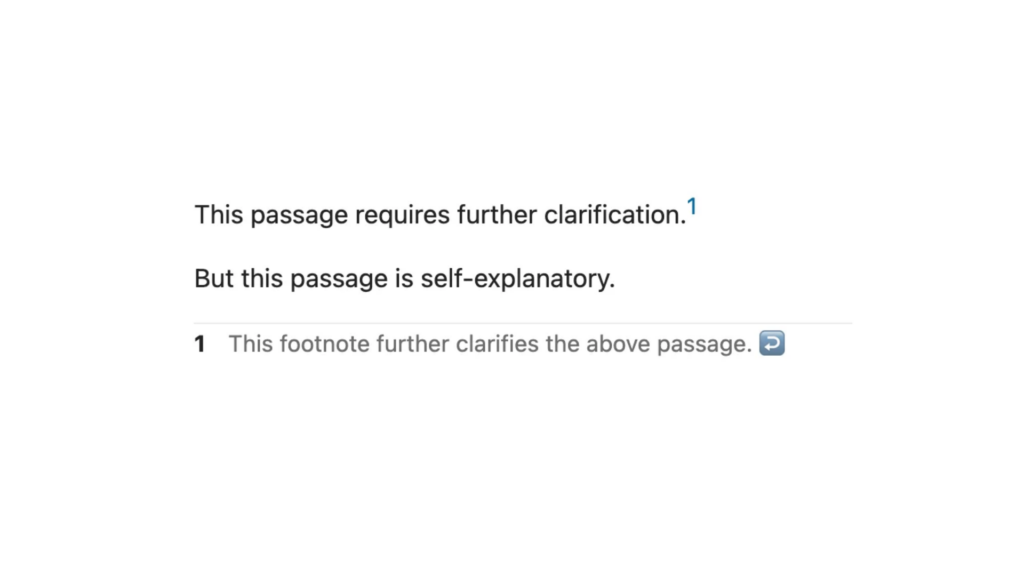
John Gruber’s original Markdown syntax description from 2004 lacked one aspect that was crucial for writing academic papers: footnotes. That’s why a community-driven extension introduced the [^1] syntax, which quickly became the de facto standard for including footnotes and is now supported by many Markdown parsers.
You simply place a caret and an identifier (can be a number, but doesn’t have to be) in square brackets where you want the footnote marker to appear, then define the footnote on its own line using the same identifier followed by a colon:
This passage requires further clarification.[^1]

But this passage is self-explanatory.

[^1]: This footnote further clarifies the above passage.
Markdown comments that don’t break portability
We took the footnote feature and, to make comments work with it, added syntax for comment replies, display names, Nextcloud user IDs, and timestamps.
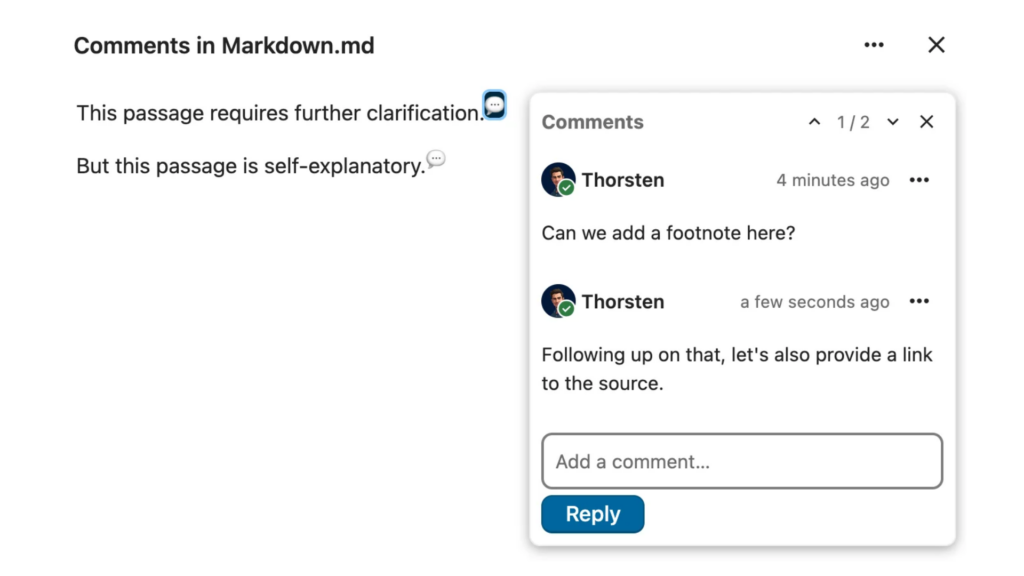
To insert a comment in your Markdown file, simply click on the new speech bubble icon in Nextcloud Text’s toolbar. This will insert a comment mark at the current cursor position and the comment thread will open, allowing you to type your comment.
In the raw text, the comments will look like this:
This passage requires further clarification.[^comment-1]

But this passage is self-explanatory.[^comment-2]

[^comment-1]:
    - @[Thorsten](mention://user/thorsten) *(2026-10-05T13:14:57.626Z)*
      Can we add a footnote here?
    - @[Thorsten](mention://user/thorsten) *(2026-10-05T13:17:48.080Z)*
      Following up on that, let's also provide a link to the source.

[^comment-2]:
    - @[Thorsten](mention://user/thorsten) *(2026-10-05T13:18:05.184Z)*
      Actually, I think this needs further clarification as well.
Let’s break this down:
[^comment-1] marks the first comment thread created in the document, [^comment-2] the second one (these are actually footnote identifiers).- At the end of the document, you get a list for each comment thread. Each item represents one comment in that thread and contains the following information:
- A mention of the comment author that contains their display name and Nextcloud user ID, formatted as a Markdown link (e.g.
@[Thorsten](mention://user/thorsten))
- The comment’s timestamp (e.g.
(2026-10-05T13:14:57.626Z))
- The comment’s content (e.g.
Can we add a footnote here?)
Technically, these are still footnotes, but Nextcloud Text’s Markdown parser recognizes them as comment syntax and interprets them visually, so you get the speech bubbles that signify inline comments as well as the UI for comment threads that lets you quickly type and add a reply.
The advantage of using widely supported syntax for this feature is that comments inserted in Nextcloud Text are still legible if you open the file in another tool with Markdown support.
And the cherry on top: since Nextcloud Notes and Nextcloud Collectives are based on Nextcloud Text, these two apps now support Markdown comments as well!
Nextcloud apps: a true community effort
Markdown comments are just one of many features requested by the Nextcloud community that we implemented as part of Nextcloud Hub 26 Summer. We highly value the input from Nextcloud users and contributors and try our best to make each app the best it can be based on your feedback.
If features like this make you want to contribute, have you ever thought about building your own Nextcloud app? We’ve released a beginner’s guide to teach you the basics of how Nextcloud works under the hood and how you can build your app around that.
After that, you’re ready for Nextcloud Academy, a free resource with hands-on online courses that take you from setting up your development environment all the way to a finished Nextcloud app. You can even choose between PHP and Python. Give it a try!