While Nextcloud is often used in companies to replace aging ‘shared folder’ solutions like a Windows Network Drive, the sharing model modern Dropbox-like solutions use is very different. Rather than a single, fixed folder structure available to all users and tightly controlled by IT, users have their own view on their data and can share files and folders at will with others, who will receive shared files in their home file view.
As this release brings so many improvements, we’ve written 4 other blogs with more details about the main features:
A major difference between the folder tree ruled by system administrators and the user-centric view is the use of access control lists (ACL’s) in the ‘old’ world. These allow an admin to share a folder with all users while changing the access rights on sub folders and folders in those folders and so on. This makes it possible to have read-only access to a top folder, write access to a sub folder, read-only to a folder in there again and so on. Nextcloud can give users access to a Windows Network Drive as external storage and respects these ACL’s, but does not otherwise expose them for manipulation.
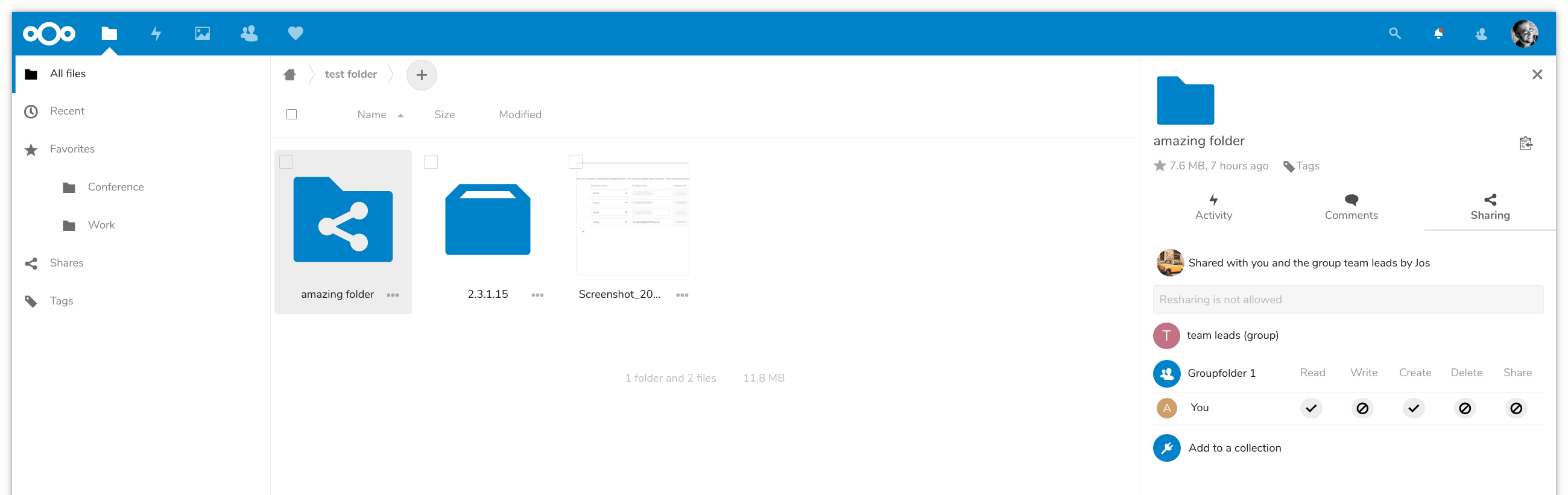
Nextcloud 16 introduces support for ACL’s in group folders. System administrators can set, on every file and (sub)folder in a group share, specific access rights. These are inherited by default, so a ‘no write access’ for a specific user or group will apply to all files and sub folders, unless overridden again by the system administrator.
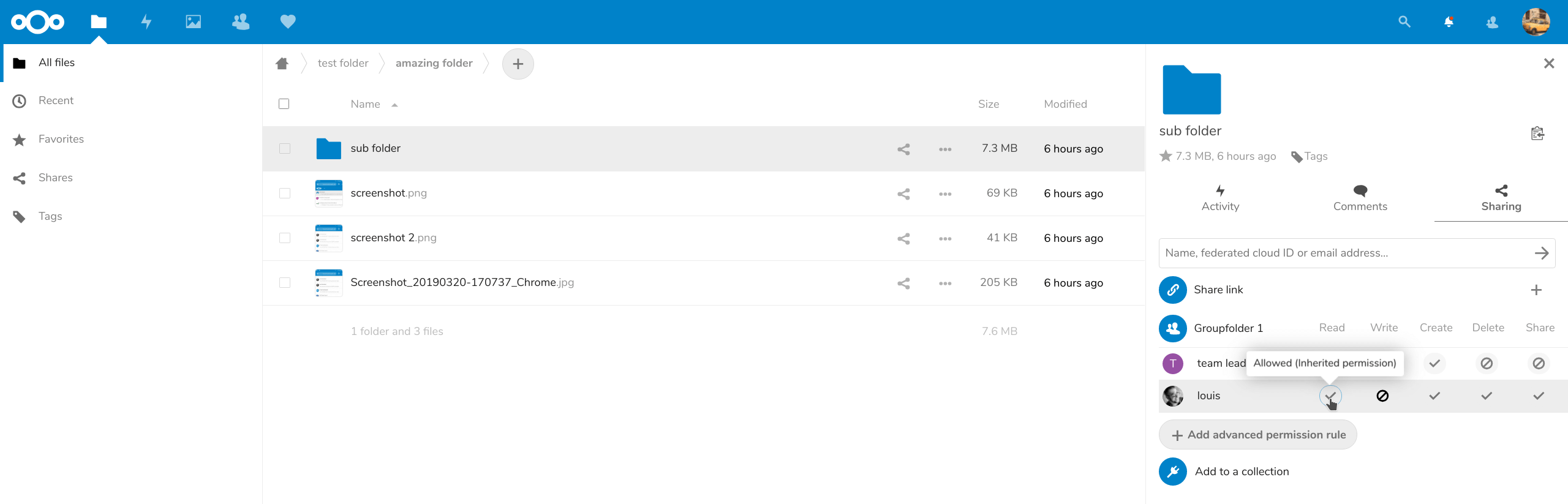
Available for configuration are Read, Write, Create, Delete and Share permissions, each of which can be set to ‘inherit’, ‘allow’ or ‘deny’ for each user or group for each file and (sub)folder in a group share.
How it works
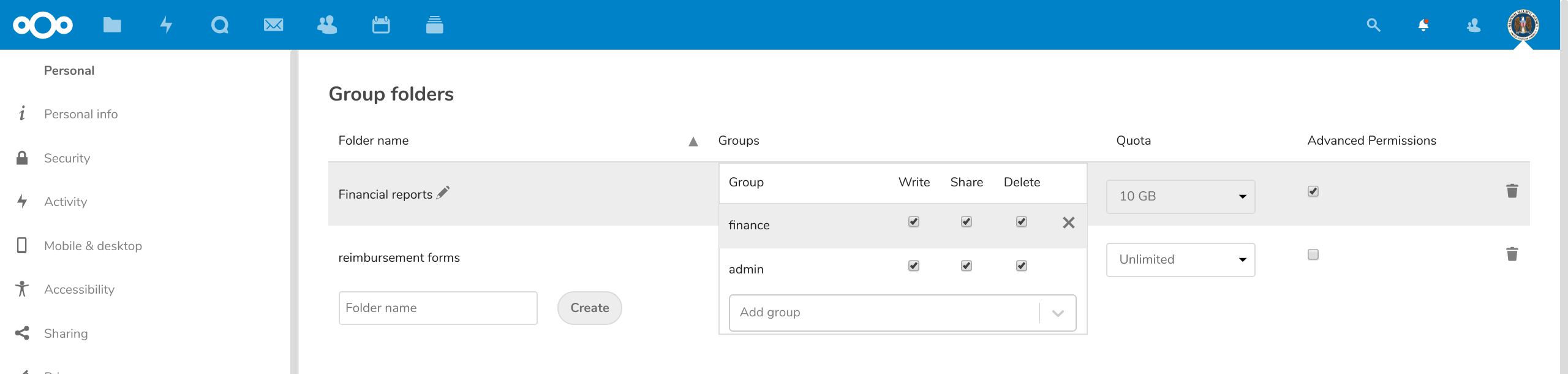
To set up a group folder with ACL’s, the administrator enables the Group Folders app, creates a group folder and selects the groups who should have access to it. Make sure the admin who has to set up the permissions is included. Then, enable the ‘advanced permissions’ setting.
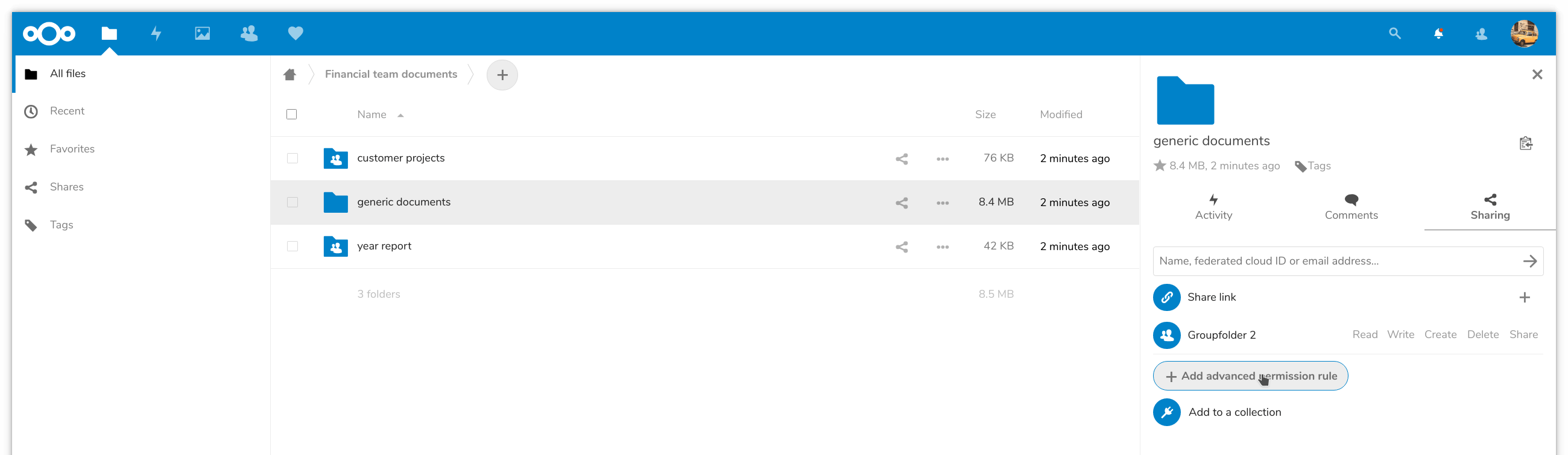
In the Files app, go to the group folder and look at the sharing view. There will be a group folder permissions view, where you can specify permissions. Use the ‘Add advanced permission rule’ button to add a rule.
You now pick from a list of all groups and users who have access to the group folder and can then set the fine-grained permissions. Note that ‘inherit’ is default, and by removing the rule with the ‘x’ on the right you can return to the permissions inherited from the parent folder.
Users can see what their rights are, but not modify them.
Oggi presentiamo Nextcloud Hub 26 Spring, la nostra versione celebrativa. Ti offre una scelta ancora più ampia di strumenti, un'interfaccia più curata, una collaborazione senza stress e la nuova strategia di piattaforma, che permette agli sviluppatori di sfruttare meglio il nostro vasto ecosistema. costruito insieme, progettato per il futuro
Nextcloud Hub 25 Autumn semplifica l'avvio di una potente collaborazione con il pieno controllo dei tuoi dati. Dagli aggiornamenti del design globale al miglioramento dell'usabilità e delle prestazioni, scopri la nostra ultima release in questo blog.
Le organizzazioni, grandi e piccole, necessitano di una soluzione che garantisca la resilienza e la sovranità digitale delle loro operazioni: un'alternativa open source e rispettosa della privacy a Teams. E oggi presentiamo questa soluzione: Nextcloud Talk.
Starting with Nextcloud AIO v13.3.1, you can register a free, automatically configured domain with DNS records via deSEC to streamline setting up your Nextcloud.
New maintenance updates are available for Nextcloud Hub. Read more in this post or access the full changelog on our website. Keep your server up-to-date!
Salviamo alcuni cookie per contare i visitatori e rendere il sito più facile da usare. Questi dati non lasciano il nostro server e non servono a tracciare il tuo profilo personale! Per maggiori informazioni, consulta la nostra Informativa sulla privacy. Personalizza
I cookie statistici raccolgono informazioni in forma anonima e ci aiutano a capire come i visitatori utilizzano il nostro sito web. Utilizziamo Matomo in cloud.
Servizio:Matomo
Descrizione del cookie:
_pk_ses*: Conta la prima visita dell'utente
_pk_id*: Aiuta a non contare due volte le visite.
mtm_cookie_consent: Ricorda il consenso alla memorizzazione e all'utilizzo dei cookie dato dall'utente.
Scadenza del cookie:_pk_ses*: 30 minuti
_pk_id*: 13 mesi
mtm_cookie_consent: 30 giorni