Integrated secure email service offering lowers barrier to migrate away from big tech services further
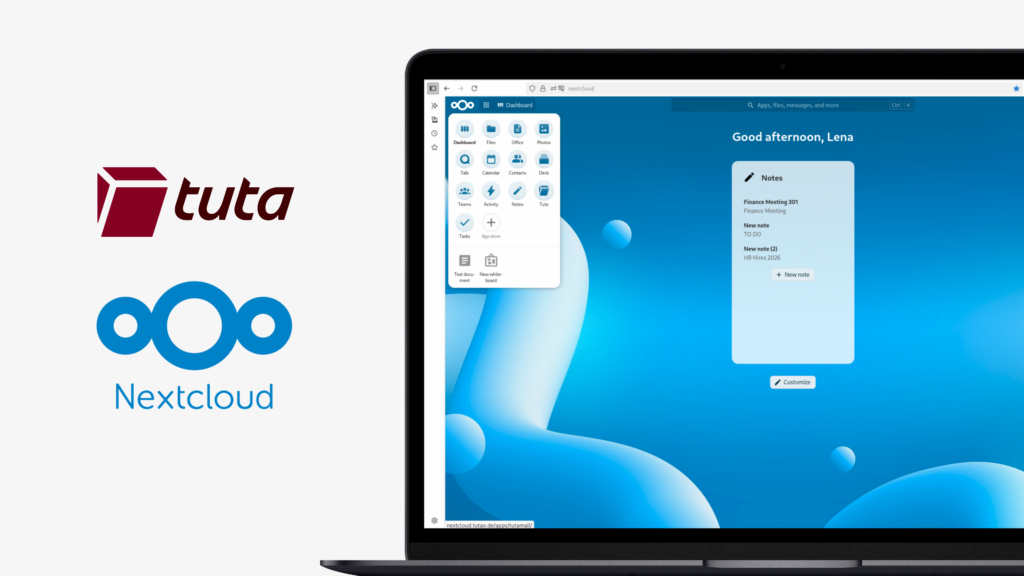
Tuta has released its Tuta Mail app on the Nextcloud App Store. The integration from the encrypted email provider from Germany makes it easier for private users and small businesses to self-host a Nextcloud collaboration environment while relying on Tuta for professionally operated, end-to-end encrypted email.
Tuta Mail provides secure email, calendar and contacts, while Nextcloud offers file storage, collaboration and communication tools. Together, the two services make it possible to combine these essential parts of a digital workplace while keeping control of data and infrastructure.
The integration connects Tuta and Nextcloud directly, allowing users to move between the two services without having to manage separate workflows. It also demonstrates how open source and privacy-focused providers can work together to offer alternatives to the closed ecosystems of Big Tech.
Nextcloud CEO Frank Karlitschek says: “Tuta and Nextcloud seamlessly working together is exactly the kind of interoperability that makes the open source ecosystem stronger and that gives people a real alternative to the closed ecosystems of Big Tech.”
Tuta CEO Matthias Pfau says: “We want that everyone is able to leave the Google and Microsoft ecosystem – easily and without any pain or loss of usability. By integrating Tuta with Nextcloud, we’re making it easier for everyone to combine secure communication with sovereign file storage and collaboration. This is the way forward, and we’re excited to see how the open source community in Europe is working together to achieve true digital sovereignty.”
The integration consists of two components: the Tuta Mail app in Nextcloud and a Nextcloud plugin in Tuta.
The Tuta Mail app for Nextcloud is available in the Nextcloud App Store. Users can install the app with one click and access Tuta Mail within their self-hosted or managed Nextcloud environment. The app needs to be installed by the Nextcloud server administrator.
The Nextcloud plugin in Tuta can be activated by an administrator for all users of a Tuta account. Once activated, the plugin enables the integrations between Tuta and Nextcloud, including saving email attachments to Nextcloud and generating Nextcloud Talk links from Tuta Calendar events.
The integration currently includes two key features:
– Users can save an attachment received via Tuta Mail directly to their Nextcloud server.
– Users can generate a Nextcloud Talk room link directly from the location field of a Tuta Calendar event.
These are the first integrations between the two services, with additional features already planned. Future possibilities include sending files from Nextcloud via Tuta Mail.
The Tuta team welcomes feedback from the community and feature requests to help prioritize further development of the Nextcloud integration.
Conclusion
The Tuta and Nextcloud integration gives users more flexibility in how they build and operate their digital workplace. Private users and small businesses can use Nextcloud for self-hosted or managed collaboration and file storage, while relying on Tuta for secure, end-to-end encrypted email without having to operate their own mail infrastructure.
The Tuta Mail app is available now in the Nextcloud App Store. The integration can be used with both self-hosted and managed Nextcloud environments, subject to the respective administrator enabling the required apps and plugins.
Nextcloud GmbH, the company behind the world’s most popular open source collaboration platform, and Munich-based growth investor Armira Growth have entered into a long-term partnership, with Armira Growth joining as a minority shareholder. Based on aligned goals and cultural fit, the partnership will further expand the ecosystem and increase adoption of digitally sovereign solutions for companies, […]
Nextcloud, el proveedor europeo líder de plataformas para la colaboración digital, ha lanzado hoy Nextcloud Hub 26 Summer. En el centro del lanzamiento se encuentra la versión de escritorio de Euro-Office, la suite ofimática europea de código abierto que ofrece a las organizaciones una alternativa soberana a Microsoft Office. Esta versión también refleja que, durante […]
In an era where cyber attacks are a matter of ‘when’, not ‘if’, strict compliance with regulations is paramount. Nextcloud recently gained two further European security certifications as well as an extensive reference DPIA. This clears the way for public sector organisations, as well as those in regulated industries, to meet the highest compliance standards […]
Guardamos algunas cookies para contar los visitantes y facilitar el uso del sitio. Esto no sale de nuestro servidor y no es para rastrearte personalmente. Consulta nuestra política de privacidad para obtener más información. Personalización
Cookies utilizadas para guardar los datos introducidos en los formularios, como nombre, correo electrónico, número de teléfono e idioma preferido.
Nombre de la cookie:nc_form_fields
Descripción de la cookie:Recuerda los datos introducidos en los formularios para la próxima vez (nombre, correo electrónico, teléfono e idioma preferido)
Caducidad de la cookie:30 días
Consentir
Nombre de la cookie:nc_utm_parameters
Descripción de la cookie:We use cookies to store UTM parameters from your visit so we can understand how you arrived at our website.
Las cookies estadísticas recopilan información de forma anónima y nos ayudan a comprender cómo utilizan nuestro sitio web nuestros visitantes. Utilizamos Matomo alojado en la nube.
Servicio:Matomo
Descripción de la cookie:
_pk_ses*: Cuenta la primera visita del usuario
_pk_id*: Ayuda a no contar dos veces las visitas.
mtm_cookie_consent: Recuerda que el usuario ha dado su consentimiento para almacenar y utilizar cookies.
Caducidad de la cookie:_pk_ses*: 30 minutos
_pk_id*: 13 meses
mtm_cookie_consent: 30 días